Large Language Models (LLMs) are powerful, but have fundamental limitations: they can only generate answers based on the data they were trained on. They do not have access to private domain-specific or up-to date information unless explicity provided to them.
This is where Retrieval-Augmented Generation (RAG) comes in.
RAG is an architectural pattern that combines:
- Information retrieval (searching external knowledge sources)
- Text Generation (Using an LLM to produce answers)
Instead of asking an LLM to answer a question in isolation, RAG allows us to :
- Retrieve relevant information from an external knowledge base
- Inject that information into the model’s prompt
- Generate answers that are grounded in real data
This approach significanttly reduces halucinations and makes LLMs usable for real world applications such as:
- Question answering over internal documents
- Knowledge assistants
- Search and discovery systems
- Enterprise analytics and decision support
- Automated customer support
RAG Pipeline Architecture
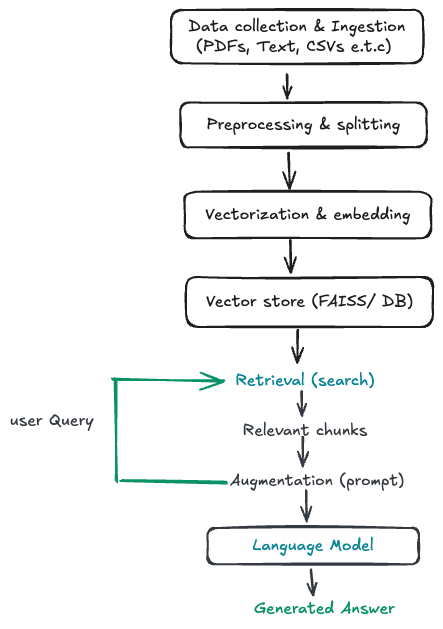
I will take the RAG architecture below and walk through a concrete implementation using a wikipedia corpus as our knowledge base, FAISS for vector search and Langchain to orchestrate the retrieval and generation steps.
Rather than treating RAG as a black box, we break it down into clear, reproducible steps:
- How raw text is ingested and prepared
- Why and where text splitting happens
- How embeddings are created and stored
- How retrieval works at query time
- How retrieved context is combined with an LLM to generate answers
-
Data Collection and Ingestion
The first step is to collect and ingest raw data. Our data source is a Wikipedia corpus of articles on a wide range of topics from huggingface datasets.
Raw wikipedia articles contain alot of extra information that is not relevant to our use case. I use a pattern matching regular expressions and spacy to clean the text. The entire notebook with this implementation can be found here.
Next I load the above cleaned and saved data into using huggingface datasets.
from datasets import load_dataset

wiki_corpus_paths = "data/output_corpus/wikipedia_processed_001.txt.gz"
dataset = load_dataset(
    "text",
    data_files={"train": wiki_corpus_paths},
    split="train"
)

texts = dataset["text"]
print(f"Loaded {len(texts)} Wikipedia text entries")
At this stage, the data is still raw text and not yet usable for retrieval.
-
Converting Text into Documents
LangChain operates on Document objects, which wrap text and optional metadata.
We convert each Wikipedia entry into a LangChain Document:
from langchain.schema import Document

documents = [
    Document(
        page_content=text,
        metadata={
            "source": "wikipedia",
            "row_id": i
        }
    )
    for i, text in enumerate(texts)
]
This step prepares the data for text splitting, embedding, and retrieval.
-
Text Splitting (chunking)
Large documents are inefficient for retrieval. Instead, RAG works best when documents are split into smaller, semantically meaningful chunks.
We use LangChain’s RecursiveCharacterTextSplitter to split documents into chunks of 512 characters with an overlap of 50 characters.
from langchain.text_splitter import RecursiveCharacterTextSplitter

text_splitter = RecursiveCharacterTextSplitter(
    chunk_size=512,
    chunk_overlap=50
)

split_docs = text_splitter.split_documents(documents)
print(f"Split into {len(split_docs)} chunks")
Why this matters:
- Smaller chunks improve embedding quality
- Retrieval becomes more precise
- The LLM receives focused context instead of entire articles
-
Vectorization (Embedding the Chunks)
Each chunk is converted into a numerical vector using a SentenceTransformer model.
These embeddings capture the semantic meaning of the text and allow similarity search.
from sentence_transformers import SentenceTransformer

model_name = "all-MiniLM-L6-v2"
model = SentenceTransformer(model_name)
At this point, text has been transformed into vectors that can be indexed.
-
Vector Storage with FAISS
FAISS (Facebook AI Similarity Search) is a library for efficient similarity search and clustering of dense vectors.
We store the embeddings in a FAISS index, which allows for fast similarity search using nearest neighbor search.
from langchain.vectorstores import FAISS vectorstore = FAISS.from_documents( split_docs, embedding ) -
Retrieval at Query Time
Once our Wikipedia text has been cleaned, chunked, embedded, and stored in FAISS, the next step is retrieval. Langchain provides a simple interface for this to create this retriever.
from langchain_community.retrievers import FAISSRetriever

retriever = FAISSRetriever(
    vectorstore=vectorstore,
    k=3
)
A retriever’s job is simple: given a query, it returns the most relevant documents from the vector store.
In the above example, we create a retriever that returns the 3 most similar documents for a given query.
-
Generation with Context
Next step involves defining how the model should use the retrieved context.
We do this using a prompt template.
system_prompt = """You are a highly intelligent question answering bot.
Use the following pieces of context to answer the question at the end.
If you don't know the answer, just say that you don't know, don't try to make up an answer.

{context}
"""
Key ideas here:
- The model is explicitly told to use the retrieved context
{context}is where LangChain will automatically inject the retrieved Wikipedia chunks- The instruction to not make up answers reduces hallucinations
-
Creating a Chat Prompt Template
Next we wrap the system instructions into a structured chat prompt
prompt = ChatPromptTemplate.from_messages([
    ("system", system_prompt),
    ("human", "{input}")
])
This sets up a conversation where:
- The system message defines the rules
- The human message is the user’s question
{input}will later be replaced with the actual query- This makes the prompt reusable for any question.
-
Combining Retrieved Documents into a Single Context
When multiple documents are retrieved, they need to be combined before being sent to the LLM.
That’s what
create_stuff_documents_chaindoes.document_chain = create_stuff_documents_chain( llm, prompt=prompt )This chain:
- Takes all retrieved Wikipedia chunks
- “Stuffs” them into the {context} section of the prompt
- Sends everything to the language model in one request
-
Creating the Retrieval-Augmented QA Chain
Finally, we connect retrieval and generation into one pipeline.
qa = create_retrieval_chain(
    retriever=retriever,
    document_chain=document_chain
)
This single chain now does the full RAG loop:
- User asks a question
- Relevant Wikipedia chunks are retrieved from FAISS
- Retrieved text is injected into the prompt
- The LLM generates an answer grounded in that context
At this point, you have a fully working RAG system.
In the next step. I will look into better strategies for chunking and searching data to improve the performance of the RAG system.